More than once we've watched a team get the news that master needs to be rebuilt: a corrupt system table, a botched service pack, a disk that ran out mid-write. The panic isn't about running the rebuild command. It's that nobody can say what is in master that the rebuild is about to erase: a credential for a linked server, a trigger that fires on every login, a startup procedure somebody wrote years ago and never documented.
What is in master on a SQL Server instance? What is in master, on most SQL Server instances, is more than anyone assumes: over the years, teams add credentials, linked server logins, startup procedures, DDL triggers, and custom permissions directly to the master database, rarely documenting any of it, until a rebuild threatens to remove all of it without warning.
The instinct is to check master's size and decide it looks the same as always, a handful of megabytes, nothing to see. That instinct misses the point: a credential takes almost no space, and neither does a DDL trigger or a startup procedure. Size tells you nothing about what somebody added five years ago and forgot to write down. Database Health Monitor's master Overview report exists for exactly that gap: it opens under the Master tree node for the master database on an instance, and lists every page in the master suite next to what it actually found.
What Is in Master, Ranked by What It Found
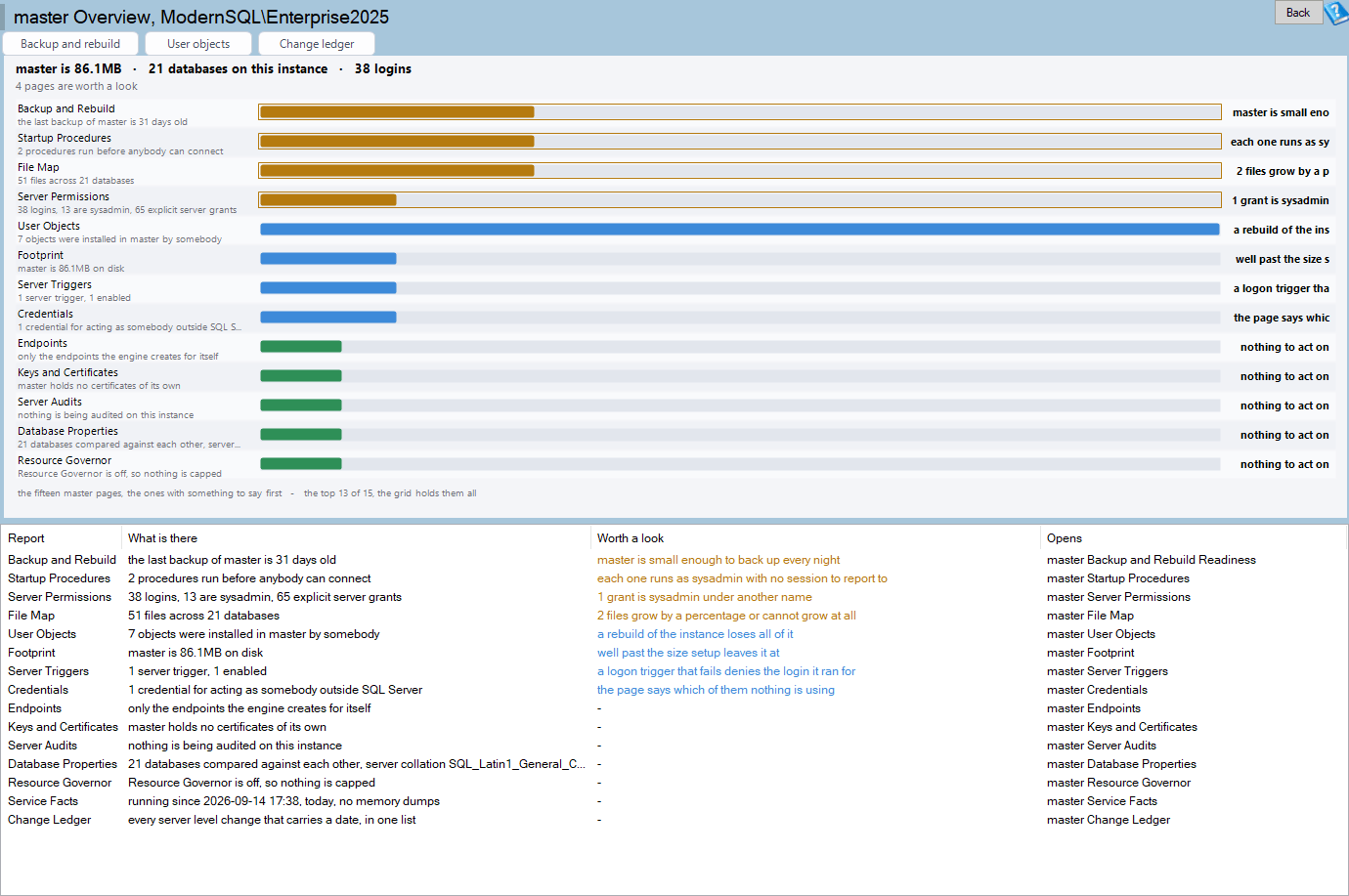
master Overview is one of the reports in Database Health Monitor. It runs against your own servers, and it takes about a minute to have this same screen open on one of them.
Open it and the top line counts three things: how many databases exist, how many server logins exist, and how many objects live in master itself. Below that, one row per page in the fifteen-page master suite, each with a count and, where it matters, a sentence explaining why that count is worth a second look. A page that turns up nothing gets marked as such instead of being left out, so silence on the page means something was actually checked, not skipped.
Reading the Bars Before You Open Anything
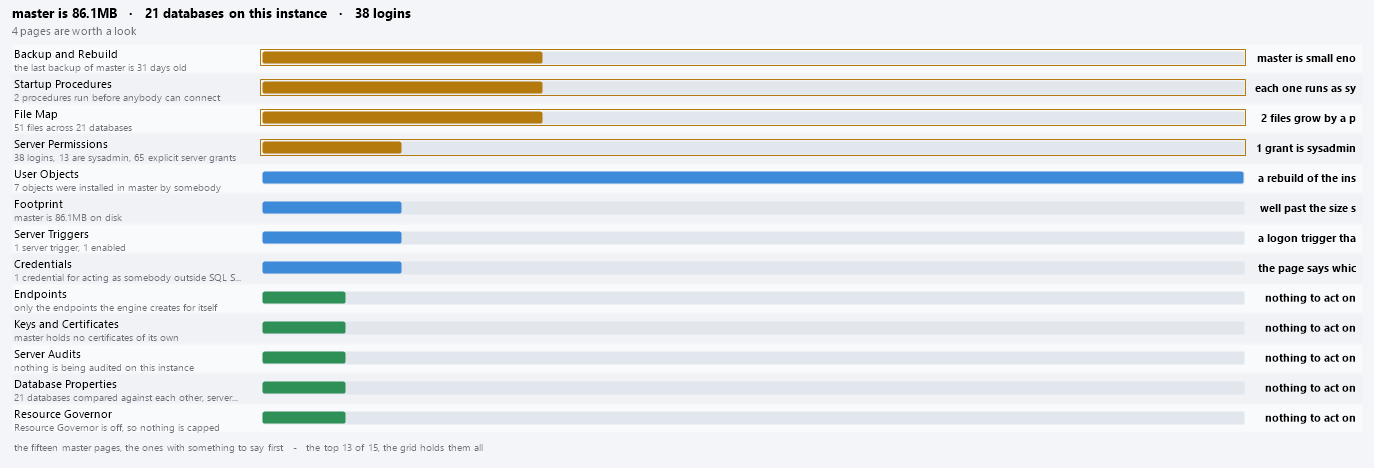
The chart underneath ranks the same fifteen pages by color: amber for the ones worth opening today, blue for pages with something in them, and green for the ones with nothing to act on yet. Reading it takes seconds, not a report at a time. Underneath the ranking, the counts come from three separate trips rather than one big query. Catalog counts work for any login that can see the catalog. The two DMV counts need 'VIEW SERVER STATE', and a DMV without that permission raises an error rather than returning zero, so it runs on its own instead of taking the rest of the page down with it. The last backup date comes from 'msdb', because plenty of logins can read master and still have no access there.
- Click a bar to jump to that page's row in the grid
- Double-click a bar, or a grid row, to open that page directly
- Right-click an empty part of the chart to copy it to the clipboard for a ticket or an email
Before the Next Rebuild, Not During It
The toolbar puts three of those fifteen pages one click away: Backup and Rebuild Readiness, User Objects, and Change Ledger, because those are the three questions that actually come up when master is in trouble. None of them replace the full master Overview reference for every column and every page, but they are the three worth bookmarking. The habit is the same one that pays off anywhere in the product, run the overview before the problem forces your hand, the way What a SQL Server Index Health Score Really Tells You makes the case for indexes.
What to check on your own server
- Check when master's backup was last taken and compare that date to what has changed since
- List what has been installed directly in master, since a rebuild will not bring any of it back
- Note every credential and linked server login master is holding, and confirm each one is still in use
- Review server triggers and startup procedures for code that runs on every login or every connection
Try Database Health Monitor Today
It shows what your master database is actually holding, credentials, triggers, startup procedures and all, before a rebuild wipes it out and you find out the hard way. Database Health Monitor shows it on every instance you connect, in the time it takes to open the report.
Download Database Health Monitor and run the master Overview report against your own server. There is nothing to configure first, and you will know inside a few minutes whether it tells you something you did not already know.